Ok so I am glad to have attracted the attention of so many of you with animalandroid! I'm afraid to say that I am struggling to have the time to post regularly, and therefore I am going to be posting weekends only but with big updates! Any comments or questions please let me know, thanks guys :)
And be sure to check for updates on weekends!

Monday, 6 May 2013

Sunday, 5 May 2013
Nova Launcher Review
Ok so it isn't completely finished but I have published the page regarding my review of my most trusted home replacement launcher for my android device! Nova Launcher definitely deserves all the respect you can give it, and hasn't let me down yet! Click here to take a look at my review of Nova Launcher.

Saturday, 4 May 2013
Play Store Update
Well yesterday GooglePlay updated on my galaxy S2! I knew it wouldn't be that long that's why I waited instead of getting it unofficially as mentioned in a previous post. Will post some screenshots later on, as well as a full review of nova launcher as a new page! I'm out most of the day today but will update it as soon as possible.
Friday, 3 May 2013
No Posts Today
I'm Woking on a new page for tomorrow so wont be updating the blog for today! Will keep you posted :D
Thursday, 2 May 2013
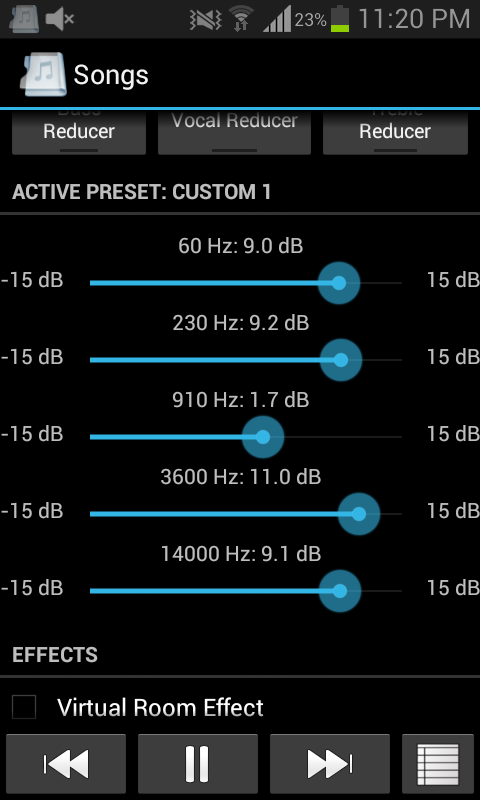
Music Folder Player
The full review I gave for this is on the Top 10 most useful apps page I just wanted to point out that the equalizer on this application can be fully edited by you! You choose every variation and therefore can mess on until you get the correct sound quality to suit both your headphones and the phone. If you haven't already download this app now its the best music player app that there is!

Galaxy S4 Review
Some of you may be interested a recent review by +TechRadar gives the Samsung Galaxy S4 4.5 stars out of 5. Below are the "for and against" to help you decide if you are going to buy it or not!

FOR
- Stunning screen
- Superfast processor
- Great camera
AGAINST
- Feels cheaper than similar-priced phones
- 'Innovation' doesn't wow
- Slight UI issues

Wednesday, 1 May 2013
Tip of The Day
Save battery on your android device by making sure that the auto-sync feature is turned off for all of the accounts linked to the device. Navigate to Settings>>Accounts and make sure all are checked to sync manually, this will then prevent accounts looking up information during the day and wasting your battery life!


Subscribe to:
Posts (Atom)